
When first integrating WiKID and your VPN using radius, it can be difficult to troubleshoot without detailed logging.
Remember: you must restart the WiKID service after creating a new network client! This opens the firewall and caches the radius information.
NB: There may be a bug in the system currently. The stop command fails to fully stop the radius server. Use this instead:
wikidctl stop
killall -9 java
wikidctl start
If you need to better understand how the flow and architecture works, please see our short pdf on adding two-factor authentication to your network.
Is the server getting the request?
Start by getting an OTP from your WiKID token. We assume you have register your username to that token. Login with your username and the OTP. Once you get your OTP, check the WiKIDAdmin logs. Set the log level to debug and hit Filter. You will see:

Now, enter the username and OTP and try to login. Return to the WiKIDAdmin logs and hit Filter to refresh. If you see nothing above your OTP issuance, then the server is most likely not getting the RADIUS request at all. Check your VPN or radius server settings. If you are using NPS, check Event Viewer or whatever you use for Windows logging.
Unknown NAS Error
Radius will reject packets from unknown IPs. This error looks like:
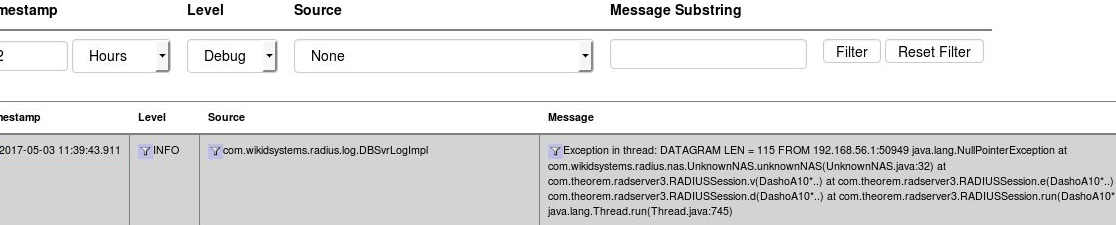
In this instance, the IP 192.168.56.1 is not the same IP as the one used in the Network Clients on the WiKID server. Update the IP and restart the WiKID service.
Using TCPDump
TCPDump can also provide valuable troubleshooting information.
yum install tcpdump
tcpdump -vvv port radius
Now you can see what requests, if any, are coming to your WiKID server. Check to make sure that they are coming from the same IP address as listed in the Network Client's tab. Make sure that the NAS IP that is requesting the authentication is exactly the same as entered in the Network Client. Hit ctrl-C to cancel tcpdump.
Run 'iptables -L -n' on the server - make sure the IP address of the NAS IP is listed too. WiKID should open up ports for network clients.
