
Recently, there was a report from Finjan that administrator credentials for over 9,000 FTP servers were for sale. Then, F-Secure noted an increase in FTP-based attacks. Many companies and organization still use FTP extensively. If you're running an FTP server and you think you're admin credentials might be one of those 9,000, you should consider implementing two-factor authentication for SSH, which will then also give you two-factor authentication for SCP. This document shows how to configure the popular and secure VSFTP to use SSL for encryption and WiKID for two-factor authentication for your FTP users.
Install and Configure VSFTP
yum install vsftpd
Create an SSL certificate if you don't already have one:
openssl req -x509 -nodes -days 365 -newkey rsa:1024 -keyout /etc/vsftpd/vsftpd.pem -out /etc/vsftpd/vsftpd.pem
Edit /etc/vsftp/vsftp.com. These settings worked when tested, but are not guaranteed to be the most secure. Please refer to
anonymous_enable=NO
local_enable=YES
write_enable=YES
local_umask=022
dirmessage_enable=YES
xferlog_enable=YES
connect_from_port_20=YES
xferlog_std_format=YES
ftpd_banner=Welcome to blah FTP service.
listen=YES

pam_service_name=vsftpd
userlist_enable=YES
tcp_wrappers=YES

pasv_enable=YES
pasv_promiscuous=YES
pasv_min_port=6000
pasv_max_port=7000

ssl_enable=YES
allow_anon_ssl=NO
force_local_logins_ssl=YES
ssl_tlsv1=YES
ssl_sslv2=YES
ssl_sslv3=YES
rsa_cert_file=/etc/vsftpd/vsftpd.pem
rsa_private_key_file=/etc/vsftpd/vsftpd.pem
Configure PAM Radius
Edit your /etc/pam.d/vsftp file to use pam radius:
#%PAM-1.0
session    optional     pam_keyinit.so    force revoke
auth       required     pam_listfile.so item=user sense=deny file=/etc/vsftpd/ftpusers onerr=succeed
auth       required     pam_shells.so
auth       required     /lib/security/pam_radius_auth.so
#auth       include     system-auth
account    include      system-auth
session    include      system-auth
session    required     pam_loginuid.so
Edit your /etc/raddb server to point to the WiKID server:
# server[:port] shared_secret      timeout (s)
127.0.0.1             secret             1
WIKID_Server_IP       wikidserver_secret      3
Configure the WiKID Strong Authentication Server
If you need to add a domain on the WiKID server, do so now:
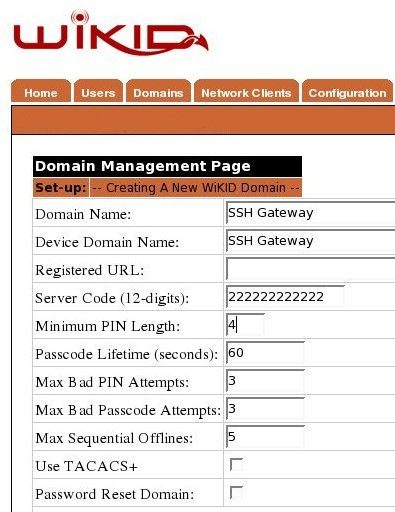
Create a network client
After saving the domain information, click on the Network Client tab and Create New Network Client. Enter a name for this client and the IP Address of the VSFTP server on the internal network. Select Radius as the protocol and the domain you created above as the domain.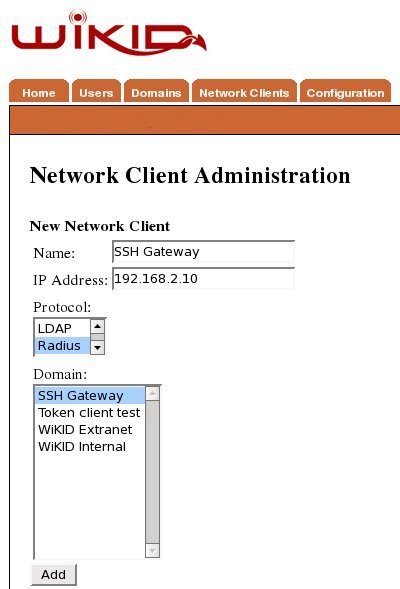
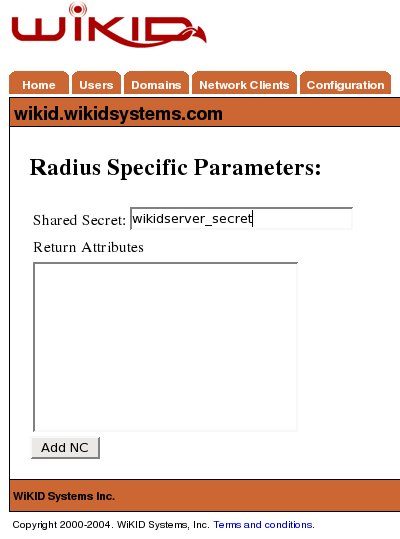
Click Add to get the next page and enter the shared secret for Radius.
VSFTP is a very popular FTP server thanks to its security and speed. I used Filezilla as an FTP client because it supports SSL. If you do implement two-factor authentication for SSH, you actually get a lot of client support too, including WinSCP. You might not care about encrypting the data, however, you still should be concerned about who is uploading data to your server and you should certainly implement two-factor authentication for your FTP administrators.
